Six things Sourcebook does for you.
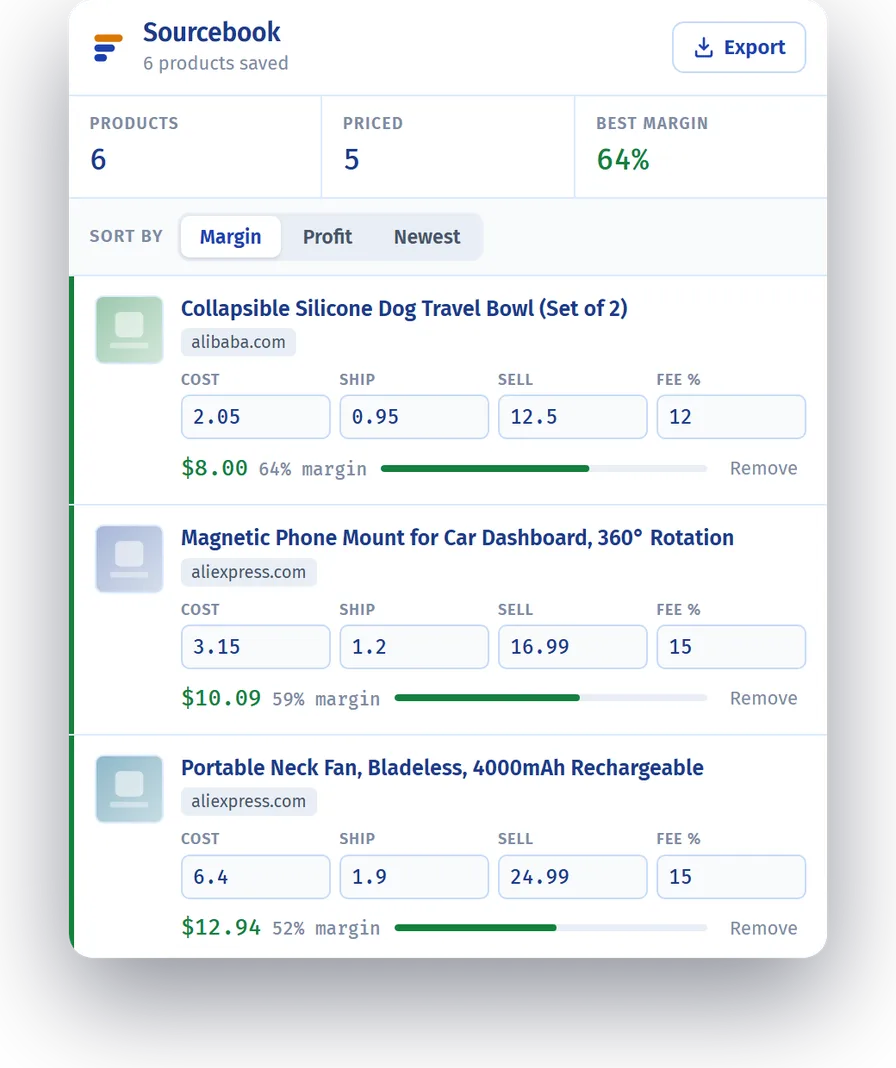
It is a shortlist that does the maths. You save the products you are thinking about, put your own costs in, and it tells you which ones are worth buying.
Saves products in one click
A button sits on every product page. Click it and the title, price, photo and link are on your list. No copying, no pasting.
Works out your real profit
Put in what it costs you, what shipping costs, what you would sell it for, and the marketplace fee. A profit calculator runs on every product on your list, giving you the profit and the margin.
Puts the best one on top
Your list sorts itself by margin, so the product worth buying is the first one you see. You can also sort by profit or by newest.
Shows losses clearly
Green means it makes money, red means it loses money, amber means you have not added a price yet. You can read the whole list without stopping.
Keeps everything on your computer
Your list is saved in your own browser. There is no account, no sign-up, and nothing is ever sent anywhere. It works with the internet switched off.
Lets you take your data
Download your whole list as a spreadsheet file whenever you want, and use it anywhere else. Nothing is locked in.
This is the whole interface.
One window. Your products, your numbers, and the answer.
Stop keeping your product list in a spreadsheet.
Free, no sign-up, and it works on the sites you already buy from.